.png?width=1344&height=768&name=Adobe%20Express%20-%20file%20(1).png)
Learning Objectives:
- Structure your workday using the 10-block framework balancing proactive customer engagement, strategic planning, and reactive work
- Apply the Eisenhower Matrix to prioritize tasks by urgency and importance, focusing on high-impact activities
- Implement time blocking to eliminate context switching and create dedicated focus periods for deep work
- Master batching techniques for similar tasks (customer calls, email processing, internal meetings) to improve efficiency
- Leverage automation tools for health score alerts, check-in reminders, and meeting transcription
- Set professional boundaries to avoid burnout through focus modes, meeting pushback, and hard work-end times
━━━━━━━━━━━━━━━━━━━━━━━━━━━━━━━━━━━━━━
Introduction
A CSM's day requires intentional planning to balance proactive and reactive customer engagement, internal collaboration, and strategic thinking. Without structured time management, CSMs become reactive firefighters responding to urgent requests while neglecting strategic activities that drive long-term customer success and revenue growth.
Effective calendar management is not about rigidly scheduling every minute—it's about allocating time proportionally to activities that matter most: customer-facing work, strategic account planning, internal collaboration, and personal development. A highly effective workday starts with time allocation frameworks rather than fixed time slots, allowing flexibility while maintaining focus on high-impact priorities.
The Cost of Poor Calendar Management
Without structured calendar management, CSMs may:
- Spend entire days in reactive mode responding to urgent emails and requests while strategic work (QBR prep, expansion planning) gets perpetually delayed
- Experience constant context switching between customer calls, internal meetings, and admin tasks, reducing efficiency by 40%+
- Miss proactive customer engagement opportunities by failing to allocate time for strategic account review and outreach
- Suffer burnout from lack of boundaries, working late nights to complete strategic work that should happen during business hours
- Lose credibility with customers due to rushed, under-prepared meetings when calendar allows no prep time
- Create volatile performance patterns with months of reactive firefighting followed by frantic end-of-quarter scrambling
The Benefits of Mastering Calendar Management
Effective calendar management enables you to:
- Maintain consistent proactive customer engagement through dedicated time blocks for strategic outreach and account planning
- Improve meeting quality significantly by allocating proper preparation time before every customer conversation
- Reduce stress and burnout through clear boundaries that protect focus time and personal time
- Increase productivity by 40%+ through batching similar tasks and eliminating context switching overhead
- Achieve predictable performance by balancing reactive work (escalations) with proactive work (expansion, risk mitigation)
- Build reputation as organized, strategic CSM who respects stakeholder time through well-structured, prepared interactions
━━━━━━━━━━━━━━━━━━━━━━━━━━━━━━━━━━━━━━
PART 1: THE 10-BLOCK DAILY WORKFLOW FRAMEWORK
Structure your day using time allocation blocks that balance all CSM responsibilities.
━━━━━━━━━━━━━━━━━━━━━━━━━━━━━━━━━━━━━━
The Complete Daily Workflow Structure
Recommended daily schedule (8-hour workday):
Block 1: Daily Preparation & Prioritization (30 minutes)
- Review customer dashboards for alerts and engagement trends
- Identify accounts needing proactive outreach today
- Review calendar and adjust for urgent issues
- Set top 3 priorities for the day
Block 2: Email Management (30 minutes)
- Categorize emails (Urgent, Follow-Up, Delegate)
- Respond to high-priority customer and internal requests
- Schedule follow-ups for lower-priority items
Block 3: Customer Calls (2 hours)
- Average 3 calls per day (onboarding, expansion, renewal check-ins)
- Drive adoption, assess health, identify opportunities
- Focus on solving customer challenges
Block 4: Lunch & Recharge (1 hour)
- Step away from screen for mental clarity
- Informal networking or industry reading
Block 5: Training & Development (30 minutes)
- Complete internal or external CSM training
- Learn negotiation techniques or success frameworks
- Review case studies from top-performing accounts
Block 6: Product Updates & Industry Research (30 minutes)
- Review recent product updates and customer impact
- Research industry trends for strategic recommendations
- Understand competitor landscape
Block 7: Team Meeting & Knowledge Sharing (1 hour)
- Share best practices with CS team
- Discuss challenging accounts needing input
- Participate in strategy syncs
Block 8: Focus Time - Book of Business Strategy (1 hour)
- Analyze account segmentation (growth, risk, maintain)
- Review renewal pipeline and flag accounts needing attention
- Develop customized engagement strategies
Block 9: Escalations & High-Priority Tasks (30 minutes)
- Work with Support/Product on critical issues
- Build QBR decks with success metrics
- Address urgent customer situations
Block 10: Day Wrap-Up (30 minutes)
- Update customer notes and close alerts in CRM
- Send recap emails with next steps
- Prepare for tomorrow's priorities
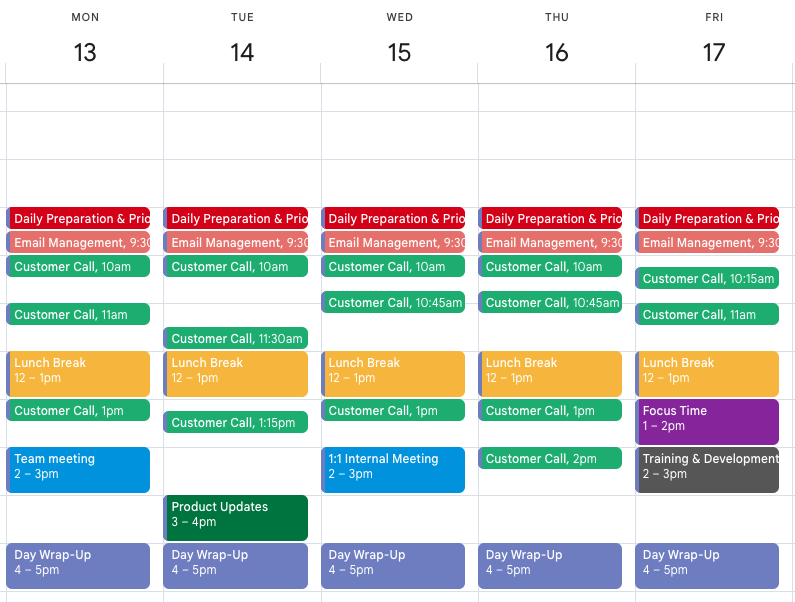
💡 Pro Tip: Don't treat this as rigid schedule requiring exact times. Instead, use percentage allocation: 25% customer-facing (blocks 3, 9), 25% strategic work (blocks 1, 8), 25% collaboration (blocks 6, 7), 25% development and admin (blocks 2, 5, 10). This ensures balanced time investment across all CSM responsibilities regardless of when activities occur.
━━━━━━━━━━━━━━━━━━━━━━━━━━━━━━━━━━━━━━
Key Workflow Blocks Explained in Detail
Block 1: Daily Preparation & Prioritization (30 minutes)
Objective: Set priorities for the day by reviewing customer data and identifying key actions.
Activities:
- Review Customer Dashboards
- Identify customers needing proactive engagement based on recent activity
- Check open alerts (low usage, negative survey responses, upcoming renewals)
- Flag accounts showing early warning signs
- Review Calendar Blocks for Day/Week
- Ensure time allocated for customer calls, internal meetings, strategic work
- Adjust schedule for urgent issues or last-minute customer needs
- Confirm all meetings have prep time before them
- Set Top 3 Priorities
- What MUST happen today for success?
- Which accounts require attention?
- What strategic work cannot be delayed?
Example: CSM notices enterprise account has had low engagement past 2 months. Priorities become: (1) Schedule re-engagement call with stakeholder, (2) Analyze usage data to understand drop, (3) Prepare value demonstration for renewal conversation.
Block 3: Customer Calls (2 hours - Average 3 Calls per Day)
Objective: Drive adoption, solve customer challenges, and assess account health.
Each call should:
- Solve for customer's key challenges (not just product updates)
- Drive adoption and maximize use of product features
- Gauge overall account health and renewal intent
- Identify expansion opportunities through discovery
Types of customer calls:
- Onboarding/Adoption Call → Ensure customers using key features effectively
- Expansion/Upsell Call → Identify additional needs and position product upgrades
- Renewal Check-In Call → Assess sentiment before renewal discussions
- Risk Mitigation Call → Address concerns with at-risk accounts
- Strategic QBR → Quarterly business review with stakeholders
Example: During QBR call, CSM demonstrates new feature tailored to customer's business model, increasing engagement and identifying $15K upsell opportunity.
Block 8: Focus Time - Book of Business Strategy (1 hour)
Objective: Strategically assess customer accounts for growth, risk, and retention.
Use this time to:
Analyze account segmentation:
- Growth accounts → Identify expansion opportunities, prepare upsell business cases
- Risk accounts → Develop action plans for re-engagement, address churn signals
- Maintain accounts → Ensure continued value delivery, schedule proactive check-ins
Review renewal pipeline:
- Flag accounts needing additional touchpoints 90+ days before renewal
- Identify which renewals are confirmed vs. at-risk
- Calculate forecasted revenue impact
Develop customized engagement strategies:
- High-touch strategic plans for Tier 1 accounts
- Automated campaigns for Tier 3 accounts
- Expansion roadmaps for growth-ready customers
Example: CSM creates priority list of 5 accounts with low usage and schedules outreach campaigns for personalized training sessions. Identifies 3 accounts approaching renewal without recent strategic conversations and blocks time for executive business reviews.
💡 Pro Tip: Protect Focus Time aggressively. This is when you do strategic thinking that prevents future fires rather than fighting current fires. Block it on calendar as "Deep Work - Customer Strategy" and decline meeting requests during this time unless truly urgent. CSMs who maintain consistent weekly focus time achieve 30% higher NRR through proactive account management.
Block 10: Day Wrap-Up (30 minutes)
Objective: Ensure all critical tasks completed before closing the day.
Activities:
- Update Customer Notes & Close Alerts
- Log insights from customer interactions into CRM
- Mark open alerts as resolved if action taken
- Document commitments made during calls
- Clear Emails & Follow-Ups
- Send recap emails with next steps after customer calls
- Ensure all pending customer communications addressed
- Schedule tomorrow's follow-up tasks
- Prep Tomorrow's Priorities
- Review tomorrow's calendar
- Flag any prep needed for morning meetings
- Set top 3 priorities for next day
Example: After renewal call, CSM documents customer's renewal likelihood (80% confident), schedules follow-up with Account Executive, sends recap email with pricing proposal, and blocks time tomorrow for contract preparation.
━━━━━━━━━━━━━━━━━━━━━━━━━━━━━━━━━━━━━━
Best Practices: Daily Workflow Structure
- Allocate time proportionally across four categories: 25% customer-facing, 25% strategic work, 25% collaboration, 25% development/admin
- Protect morning prep time (Block 1) to set daily priorities rather than starting reactively with email inbox
- Schedule customer calls in consolidated blocks (Block 3) to minimize context switching between meetings
- Guard focus time (Block 8) aggressively for strategic account work that prevents future crises
- Use wrap-up time (Block 10) consistently to maintain CRM hygiene and prepare for next day
- Build flexibility into schedule for urgent escalations while maintaining core time blocks
- Review weekly whether time allocation matches priorities and adjust blocks as needed
- Color-code calendar blocks to visually distinguish customer time, internal time, and strategic work
━━━━━━━━━━━━━━━━━━━━━━━━━━━━━━━━━━━━━━
PART 2: PRIORITIZING TASKS USING THE EISENHOWER MATRIX
Focus on tasks that drive customer success and business impact by categorizing work systematically.
━━━━━━━━━━━━━━━━━━━━━━━━━━━━━━━━━━━━━━
The Four Quadrants of Priority
Quadrant 1: Urgent & Important (DO NOW)
Characteristics:
- Immediate impact on customer or business
- Deadline-driven with consequences for missing
- Cannot be delegated or delayed
Examples for CSMs:
- At-risk customer escalations requiring immediate intervention
- Renewal negotiations with contract expiring this week
- Critical product issues affecting customer operations
- Executive requests for customer data or insights
Action: Handle these immediately, ideally in Block 9 (Escalations) or by adjusting day's schedule.
Time allocation: Should be <20% of your week. If consistently >30%, you're too reactive.
Quadrant 2: Important but Not Urgent (SCHEDULE)
Characteristics:
- High impact on long-term success
- No immediate deadline but critical for performance
- Strategic vs. reactive work
Examples for CSMs:
- QBR preparation and strategic account planning
- Customer strategy development and segmentation analysis
- Training and professional development
- Proactive expansion conversations (not deadline-driven)
- Building renewal ROI presentations 90 days before contract end
Action: Schedule dedicated time in Block 8 (Focus Time) and Block 5 (Training).
Time allocation: Should be 40-50% of your week. This is where high-performing CSMs differentiate themselves.
Quadrant 3: Urgent but Not Important (DELEGATE OR MINIMIZE)
Characteristics:
- Feels urgent due to notifications or requests
- Low actual impact on customer success or business
- Often can be handled by others or asynchronously
Examples for CSMs:
- Internal meetings that could be async updates
- Quick responses to low-impact emails
- Requests for information others could provide
- Non-critical Slack messages demanding immediate attention
Action: Delegate when possible, batch when necessary, decline when appropriate.
Time allocation: Minimize to <20% of week through delegation and boundary-setting.
Quadrant 4: Not Urgent & Not Important (ELIMINATE)
Characteristics:
- No deadline and no meaningful impact
- Distractions or time-wasters
- Low value activities
Examples for CSMs:
- Excessive social media checking
- Unnecessary administrative work
- Low-priority internal discussions
- Perfectionism on non-critical deliverables
Action: Eliminate entirely or batch to end-of-day when energy is lower.
Time allocation: Should be <10% of week. Audit ruthlessly.
Eisenhower Matrix Application Example:
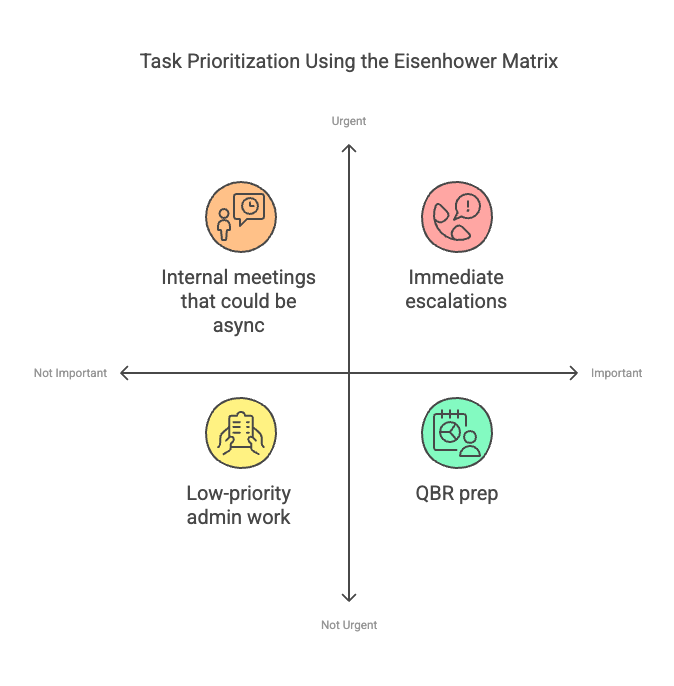
Monday morning inbox analysis:
| Quadrant | Action | |
|---|---|---|
| Enterprise customer escalation | Q1: Urgent & Important | Handle now (Block 9) |
| QBR deck due in 2 weeks | Q2: Important Not Urgent | Schedule in Focus Time (Block 8) |
| Internal team meeting invite | Q3: Urgent Not Important | Decline, request async update |
| LinkedIn notification | Q4: Not Urgent/Important | Ignore/eliminate |
💡 Pro Tip: Start each day with 5-minute Eisenhower audit. Look at your task list and calendar, categorize everything into quadrants, then ruthlessly eliminate Q4, delegate/minimize Q3, schedule Q2 into Focus Time, and handle Q1 immediately. CSMs who consistently prioritize Q2 work (strategic, not urgent) outperform reactive CSMs by 40%+ in NRR and expansion metrics.
━━━━━━━━━━━━━━━━━━━━━━━━━━━━━━━━━━━━━━
Best Practices: Task Prioritization
- Use Eisenhower Matrix daily to categorize all tasks and meetings into four quadrants
- Aim for 40-50% of time in Quadrant 2 (Important Not Urgent) where strategic work happens
- Keep Quadrant 1 (Urgent & Important) below 20% of week—if higher, you're too reactive and need systems improvement
- Delegate or minimize Quadrant 3 aggressively through boundary-setting and async communication
- Eliminate Quadrant 4 ruthlessly—these activities provide no value and steal time from strategic work
- Review weekly time allocation to ensure priorities match where time actually went
- Build systems that reduce Q1 time (automate alerts, proactive outreach, early risk identification)
- Protect Q2 time fiercely—this is where high-performing CSMs create long-term success
━━━━━━━━━━━━━━━━━━━━━━━━━━━━━━━━━━━━━━
PART 3: TIME BLOCKING AND BATCHING TECHNIQUES
Eliminate context switching and improve focus through strategic time blocking and task batching.
━━━━━━━━━━━━━━━━━━━━━━━━━━━━━━━━━━━━━━
Time Blocking Strategy
What it is: Allocating specific time slots for different types of tasks to avoid multitasking and distractions.
The Five Core Time Blocks:
1. Morning Block (First 60-90 minutes of day)
Purpose: Daily planning, reviewing dashboards, email prioritization
Why morning: Mental energy highest, sets direction for entire day
Activities:
- Block 1: Daily Prep (30 min)
- Block 2: Email triage (30 min)
- Quick review of customer health alerts
2. Customer-Facing Block (Mid-morning to early afternoon)
Purpose: Back-to-back calls to reduce context switching and maximize engagement
Why consolidated: Easier to prepare once for "call mode" than switching between calls and other work
Activities:
- Block 3: Customer calls (2 hours, typically 3 calls)
- Brief notes after each call (5 min)
- No emails or admin during this block
3. Internal Alignment Block (After lunch or mid-afternoon)
Purpose: Dedicated time for internal meetings, strategy syncs, cross-team collaboration
Why separate: Keeps internal coordination from fragmenting customer-facing time
Activities:
- Block 7: Team meetings (1 hour)
- Cross-functional syncs with Sales, Product, Support
- Internal strategy discussions
4. Focus Time Block (Afternoon)
Purpose: Deep work on customer segmentation, QBR prep, renewal forecasting, strategy
Why afternoon: After reactive work handled, dedicated uninterrupted time for strategic thinking
Activities:
- Block 8: Book of business strategy (1 hour)
- No meetings scheduled
- Notifications silenced
- Strategic planning and analysis
5. End-of-Day Block (Final 30-60 minutes)
Purpose: Wrap-up, follow-ups, note logging, planning for next day
Why end-of-day: Closes loops and ensures nothing forgotten overnight
Activities:
- Block 9: Escalations (30 min)
- Block 10: Day wrap-up (30 min)
- Tomorrow's prep
Color-Coding Recommendation:
- 🟦 Blue: Customer-facing time (Blocks 3, 9)
- 🟩 Green: Strategic work (Blocks 1, 8)
- 🟨 Yellow: Collaboration (Blocks 6, 7)
- 🟪 Purple: Development (Blocks 5, 10)
Visual color coding helps quickly identify time allocation patterns and imbalances.
💡 Pro Tip: Use "theme days" for maximum efficiency. Example: Monday/Wednesday are heavy customer call days (Block 3 extended to 3-4 hours), Tuesday is strategic planning day (Block 8 extended), Thursday is internal alignment day (Block 7 extended), Friday is wrap-up and prep for next week. This creates rhythm and reduces daily context switching.
━━━━━━━━━━━━━━━━━━━━━━━━━━━━━━━━━━━━━━
Batching Similar Tasks for Efficiency
What it is: Grouping similar activities together to reduce context switching overhead.
The Context Switching Cost:
Research shows switching between tasks reduces efficiency by 40% due to:
- Mental recalibration time (getting back into "zone")
- Information reload (remembering where you left off)
- Momentum loss (restarting is harder than continuing)
Three Critical Batching Strategies:
1. Batch Customer Calls
Instead of: Calls scattered throughout day (9am call, 11am call, 2pm call, 4pm call)
Better: Consecutive calls in single block (10am-12pm for 3 back-to-back calls)
Benefits:
- Get into "customer conversation mode" once
- Prepare call materials once for all calls
- Minimize switching between call prep and other work
Implementation:
- Set "office hours" for customer calls (e.g., 10am-12pm, 2pm-4pm)
- Schedule all calls during these windows
- Leave 10-15 min buffer between calls for notes
2. Batch Email & Admin Work
Instead of: Constantly checking email throughout day (40+ interruptions)
Better: Process emails 2-3 times daily (morning, midday, end-of-day)
Benefits:
- Eliminates notification distraction during focused work
- Processes emails more efficiently when in "email mode"
- Protects focus time from constant interruptions
Implementation:
- Turn off email notifications
- Check emails during Blocks 2, 9, 10 only
- Use "2-minute rule" - if response takes <2 min, handle immediately; otherwise schedule
3. Batch Internal Meetings
Instead of: Meetings scattered across week fragmenting every day
Better: Consolidate internal meetings to specific days or time blocks
Benefits:
- Preserves full days for customer work and strategic planning
- Reduces meeting prep overhead
- Creates "meeting-free" focus days
Implementation:
- Designate Thursday as "internal meeting day" where possible
- Block Tuesdays as "no internal meeting day" for customer focus
- Batch recurring 1:1s and team syncs on same day
Example Weekly Calendar with Batching:
Monday: Heavy customer call day (5-6 calls batched in morning/afternoon) Tuesday: No internal meetings, full day for customer work + strategic planning Wednesday: Balanced (3 customer calls + product update meeting) Thursday: Internal meeting day (team sync, 1:1s, cross-functional alignment) Friday: Light calls (2), heavy strategy work, weekly wrap-up
💡 Pro Tip: Apply "2-Minute Rule" during email batching sessions. If email response takes <2 minutes, handle immediately. If >2 minutes, add to task list for later or schedule call instead. This prevents email batch sessions from becoming 3-hour marathons while ensuring quick wins get handled efficiently.
━━━━━━━━━━━━━━━━━━━━━━━━━━━━━━━━━━━━━━
Best Practices: Time Blocking and Batching
- Create five core time blocks in calendar: Morning prep, Customer-facing, Internal alignment, Focus time, End-of-day wrap
- Use color-coding for visual identification of time block types and quick balance assessment
- Batch customer calls in consecutive blocks rather than scattering throughout day to minimize context switching
- Process emails 2-3 times daily during designated blocks with notifications turned off between sessions
- Consolidate internal meetings to specific days when possible to preserve full customer-focused days
- Apply "theme days" for rhythm: Heavy customer days, Strategic planning days, Internal collaboration days
- Use 2-minute rule during batching: Handle quick tasks immediately, schedule longer tasks for appropriate blocks
- Protect focus time (Block 8) as sacred for strategic work—decline meetings during this period unless urgent escalation
━━━━━━━━━━━━━━━━━━━━━━━━━━━━━━━━━━━━━━
PART 4: LEVERAGING AUTOMATION AND SETTING BOUNDARIES
Use technology to automate repetitive tasks and establish boundaries that prevent burnout.
━━━━━━━━━━━━━━━━━━━━━━━━━━━━━━━━━━━━━━
Automation Opportunities for CSMs
1. Automate Customer Check-Ins
What to automate:
- Health score alerts for declining accounts
- Automated check-in reminders before renewals (90 days, 60 days, 30 days)
- Usage milestone notifications (first login, 50% adoption, 100 users)
Tools:
- HubSpot workflows for renewal reminders
- Gainsight CTAs for health score triggers
- Totango playbooks for engagement campaigns
Example: Set automated workflow: "When renewal date is 90 days away AND health score <70, create task for CSM: Schedule risk mitigation call"
2. Automate Follow-Ups
What to automate:
- Email templates for recurring communications
- Automated sequences for post-onboarding check-ins
- Scheduled QBR invitations sent automatically
Tools:
- HubSpot sequences for email automation
- Calendly for self-service scheduling
- Outreach.io for cadence management
Example: Create sequence: "7 days after onboarding, send automated check-in email with training resources. If no response in 3 days, create task for CSM follow-up call."
3. Use AI for Meeting Notes
What to automate:
- Call transcription and summarization
- Action item extraction
- Key topic identification
Tools:
- Gong for call recording and AI insights
- Otter.ai for transcription
- Fireflies for meeting summaries
Example: After customer call, AI automatically generates summary with: topics discussed, customer concerns mentioned, action items for CSM, suggested follow-ups. CSM reviews and approves instead of manual note-taking.
Automation Impact:
| Manual Process | Time Required | Automated Process | Time Saved |
|---|---|---|---|
| Manual renewal reminders | 30 min/week | Automated workflow | 30 min/week |
| Meeting note-taking | 15 min/call × 15 calls/week = 3.75 hours | AI transcription | 3.5 hours/week |
| Check-in scheduling | 20 min/week | Self-service booking | 20 min/week |
| Total | 4.5 hours/week | Automated | 4.5 hours/week saved |
4.5 hours weekly saved = 234 hours annually = 5.8 work weeks of reclaimed time
💡 Pro Tip: Identify your three most repetitive manual tasks this week (likely email follow-ups, scheduling, or meeting notes). Find automation solution for just those three. Don't try to automate everything at once—incremental automation adoption prevents overwhelm and ensures each automation actually works before adding next one.
━━━━━━━━━━━━━━━━━━━━━━━━━━━━━━━━━━━━━━
Setting Boundaries to Avoid Burnout
1. Use "Focus Mode" on Communication Tools
What it is: Designated "do not disturb" hours for deep work without interruptions.
Implementation:
- Set Slack status to "🔴 Focus Time - Available at [time]"
- Turn off email notifications during Block 8 (Focus Time)
- Set phone to Do Not Disturb with exceptions for emergencies
Example schedule:
- 2pm-3pm daily: Focus mode for strategic work (Block 8)
- No Slack messages, no emails, no interruptions
- Colleagues know to schedule non-urgent items for after 3pm
2. Push Back on Low-Impact Meetings
When to decline meetings:
- No clear agenda or objective stated
- Your attendance is optional, not required
- Information could be shared asynchronously
- Meeting conflicts with customer-facing time or focus blocks
How to decline professionally:
Instead of just "decline," respond with: "Thanks for including me. Could we handle this via email update or Slack thread instead? I have customer commitments during this time and want to ensure I'm available if escalations arise."
Or offer alternative: "I'd love to contribute but can't attend live. Could I provide my input asynchronously before the meeting so the team has my perspective?"
3. End Workday with Hard Stop
What it is: Fixed sign-off time that you respect except for true emergencies.
Implementation:
- Set calendar event at 5:30pm titled "End of Workday"
- Turn off work notifications after this time
- Communicate your hours to team: "Available 8:30am-5:30pm for non-urgent items"
- Define what qualifies as "emergency" warranting after-hours contact
Example: CSM works 8:30am-5:30pm. At 5:30pm, completes Block 10 (wrap-up), logs final notes, sets tomorrow's priorities, then shuts down. If Slack message arrives at 6pm about non-urgent item, responds next morning: "Saw your message—let's connect at 9am to discuss."
Emergency criteria (only reasons to work after hours):
- Critical customer outage affecting operations
- At-risk enterprise customer threatening immediate cancellation
- Major incident requiring all-hands response
Not emergencies:
- Colleague asking for non-urgent information
- Internal meeting invite for next week
- Customer email that can wait until morning
Why boundaries matter:
| Without Boundaries | With Boundaries |
|---|---|
| Work 7am-9pm regularly, 70-hour weeks | Work 8:30am-5:30pm, 40-hour weeks |
| Burnout within 6-12 months | Sustainable long-term performance |
| Declining work quality from exhaustion | Consistent high-quality output |
| Personal life suffers | Work-life integration maintained |
| Eventually quit or transfer | Long-term CSM career success |
💡 Pro Tip: Communicate your boundaries proactively, not reactively. Include in email signature: "Working hours: 8:30am-5:30pm CET. For urgent matters outside these hours, call [emergency number]." This sets expectations before conflicts arise. Most "urgent" requests are only urgent because sender didn't plan ahead—don't enable poor planning by being always available.
━━━━━━━━━━━━━━━━━━━━━━━━━━━━━━━━━━━━━━
Weekly Schedule Review and Optimization
Friday End-of-Week Reflection (30 minutes):
Review this week's time allocation:
- What tasks consumed too much time?
- Identify time sinks and inefficiencies
- Example: 5 hours in low-value internal meetings → Decline similar invites next week
- Where can meetings be reduced or consolidated?
- Look for recurring meetings that could be bi-weekly or async
- Example: Weekly team sync could be bi-weekly with async updates between
- What strategic activities need more focus?
- Identify Q2 work that got postponed for Q1 urgent items
- Example: QBR prep keeps getting delayed → Block 2 hours next week as non-negotiable
Plan next week's calendar:
- Reallocate time based on insights gained
- Reduce time in areas that were wasteful
- Increase time in high-impact areas that drove results
- Set priorities for customer engagement, growth planning, escalations
- Identify which accounts need attention next week
- Block time for strategic initiatives before calendar fills with reactive requests
- Block Focus Time first, then allow meetings to fill around it
- Protect Block 8 (Focus Time) by blocking it on Monday morning
- Let meeting requests fit around protected strategic time
Example Weekly Review Insights:
This week analysis:
- Spent 8 hours in internal meetings (too high)
- Only 2 hours on strategic account planning (too low)
- 4 customer escalations (need proactive systems to reduce)
Next week adjustments:
- Decline 2 recurring meetings, request async updates (save 2 hours)
- Block 4 hours Focus Time Mon/Wed for strategic work (double last week)
- Launch automated health alerts to catch issues before escalation
━━━━━━━━━━━━━━━━━━━━━━━━━━━━━━━━━━━━━━
Best Practices: Automation and Boundaries
- Automate three most repetitive tasks first: Renewal reminders, Check-in scheduling, Meeting notes
- Use AI tools for call transcription and summarization to reclaim 3-4 hours weekly from manual note-taking
- Set calendar automation for health score alerts triggering proactive CSM outreach tasks
- Implement Focus Mode during Block 8 with Slack DND and email notifications off
- Push back on low-impact meetings by requesting async alternatives or declining when attendance is optional
- Establish hard stop at end of workday with clear emergency criteria for after-hours contact
- Communicate boundaries proactively through email signature and team documentation
- Review weekly schedule every Friday to identify time waste and optimize next week's allocation
━━━━━━━━━━━━━━━━━━━━━━━━━━━━━━━━━━━━━━
KEY TAKEAWAYS: BEST PRACTICES RECAP
✓ Structure workday using 10-block framework balancing 25% customer-facing, 25% strategic, 25% collaboration, 25% development/admin
✓ Use Eisenhower Matrix to categorize tasks: Q1 Urgent/Important (do now), Q2 Important/Not Urgent (schedule), Q3 Urgent/Not Important (delegate), Q4 Neither (eliminate)
✓ Aim for 40-50% of time in Quadrant 2 (Important Not Urgent) where strategic work happens—this differentiates high performers
✓ Implement time blocking with five core blocks: Morning prep, Customer-facing, Internal alignment, Focus time, End-of-day wrap
✓ Batch similar tasks to reduce context switching: Consecutive customer calls, Email processing 2-3x daily, Internal meetings on specific days
✓ Protect Focus Time (Block 8) aggressively for strategic account work—decline meetings during this period unless urgent escalation
✓ Automate repetitive tasks to reclaim 4-5 hours weekly: Health score alerts, Renewal reminders, Meeting transcription, Check-in scheduling
✓ Set professional boundaries to prevent burnout: Focus mode for deep work, Decline low-impact meetings, Hard stop at end of workday
✓ Use theme days for rhythm: Monday/Wednesday heavy calls, Tuesday strategic planning, Thursday internal alignment, Friday wrap-up
✓ Review weekly schedule every Friday to identify time waste and optimize next week based on what worked vs. what didn't
✓ Color-code calendar blocks for visual time allocation assessment and quick identification of imbalances
✓ Communicate boundaries proactively through email signature and team norms rather than reactively defending your time